TextExpander Organizations For Teams
How a TextExpander Organization is structured
Sharing a TextExpander account with one or more additional Members means managing a TextExpander Organization. An Organization consists of Teams, Groups, and Snippets.
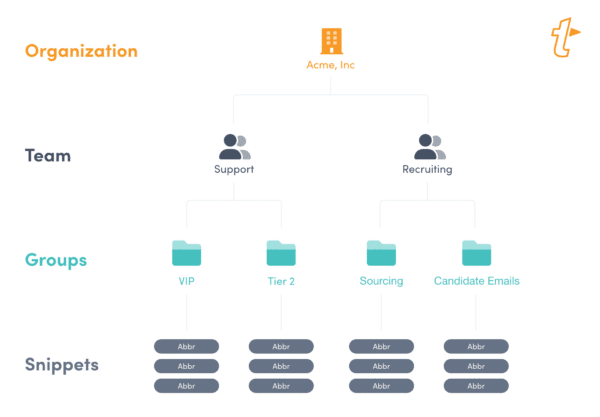
- An Organization is how you organize and manage Members, Snippet Groups, Teams, Statistics, and centralized billing. Set Organization level permissions.
- Teams are the groups of people within your organization. Organizing your Members within Teams, whether it’s by department or sales regions, allow Snippet Groups to be easily and efficiently shared in bulk. See how to use Teams in your TextExpander Organization and set Team level permissions.
- Snippet Groups are how you organize your Snippets to best suit your workflow. You can have as many Snippet Groups as necessary. For example, you may have a Snippet Group named “CRM Notes” that house all of your Snippets for your CRM notes. Set Snippet Group level permissions.
- Snippets are the long or short bits of repetitive content such as email addresses, signatures, email responses, and code chunks that you store in TextExpander and reuse with a custom abbreviation or quick search.
How to set up a TextExpander Organization
If you created your TextExpander account as a Teams account, you have an Organization already, just sign in to TextExpander.com to finish your setup. If you don’t yet have an Organization, you can create one. This will switch your account from an individual type account to a Teams account.
How to create a TextExpander Organization
- Sign in to your TextExpander.com account. If you don’t have an account on TextExpander.com, create one first.
- In the left sidebar, click on your name, then select “Add My Team”.
- Click the “Create an Organization Account” button.
How to set up an Organization
- Create the Organization
- Add some Members
- Create some Snippet Groups and prepare them for sharing
- Share the Snippet Groups with your Members
- Bonus: See how your Organization is doing by looking at the usage statistics
Depending on the size of your team, your next step is to set up some groups to share or to invite your team leads who will each be in charge of setting up groups for their teams and inviting their teams.
We suggest having some snippet groups in the organization before adding the bulk of your team members. This way, when they first set up their TextExpander accounts they’ll have organization snippets to work with immediately.